
كيف تعمل التجربة المجانية، وماذا يعني أن الحساب للقراءة فقط، وكيف تشترك شهريًا أو سنويًا.
هذه المقالة تشرح فترة التجربة المجانية، وحالات الاشتراك، وما يحدث عند انتهائه، وكيف تشترك أو تجدّد.
التجربة المجانية
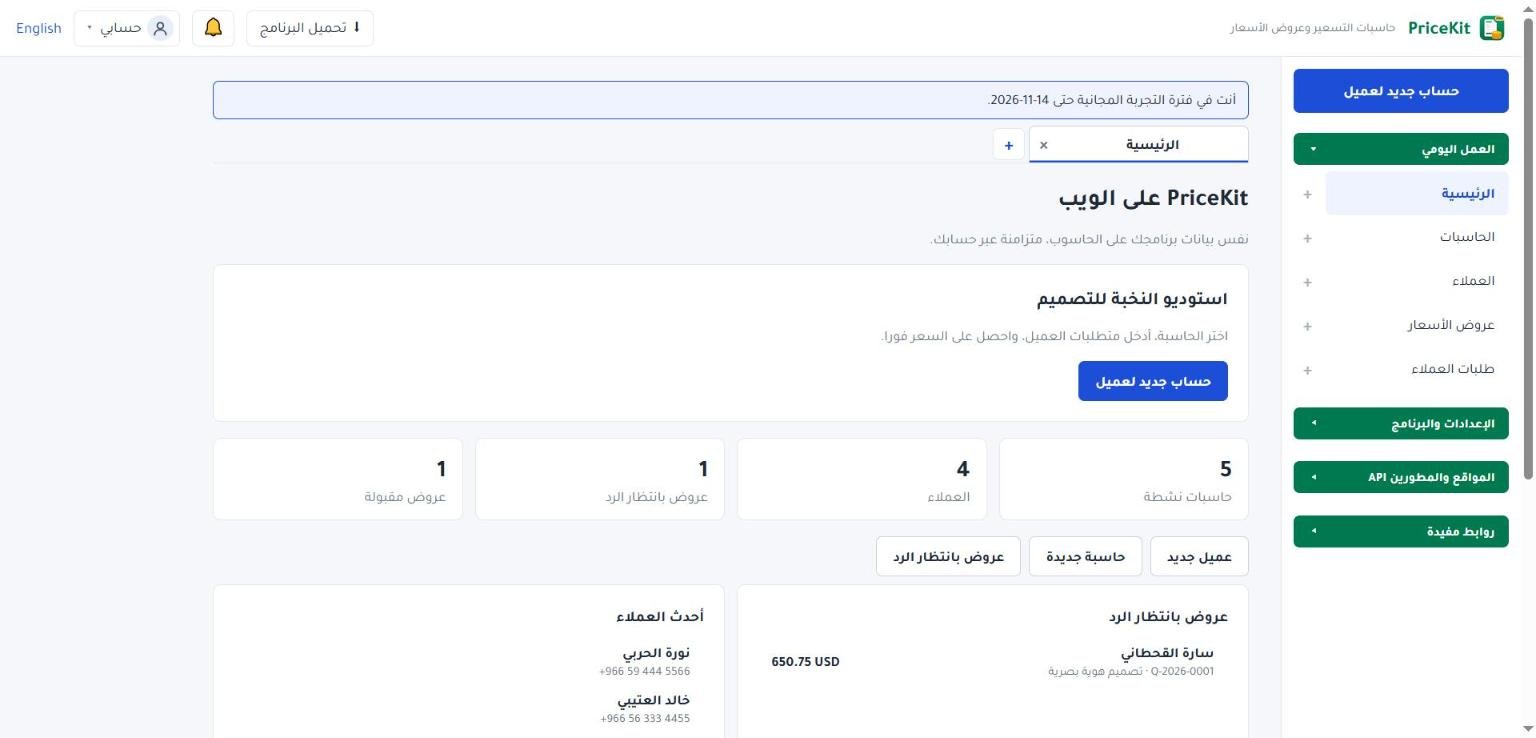
عند إنشاء حساب جديد تبدأ تجربة مجانية فيها كل الميزات، عدا تحميل برنامج ويندوز فهو للمشتركين. يعرض شريط أعلى تطبيق الويب موعد نهايتها، مثل «أنت في فترة التجربة المجانية حتى …»، وفي آخر 48 ساعة يعرض عدد الساعات الباقية.
تصلك رسالة على بريدك قبل نهاية التجربة بيوم، وأخرى عند انتهائها.
حالات الحساب
| الحالة | ما تراه | ما يمكنك فعله |
|---|---|---|
| تجربة مجانية | شريط بموعد نهاية التجربة | كل شيء، عدا تحميل البرنامج |
| مشترك | لا شريط، إلا قبل النهاية بأسبوع: «اشتراكك ينتهي في …» | كل شيء |
| انتهت التجربة أو الاشتراك | شريط تحذير بأن الحساب للقراءة فقط | عرض البيانات فقط |
| أوقفته الإدارة | «أوقفت الإدارة هذا الحساب مؤقتًا، فهو الآن للقراءة فقط. لا يُحذف أي شيء.» | عرض البيانات فقط |
ماذا يحدث عند انتهاء التجربة أو الاشتراك؟
يصبح الحساب للقراءة فقط. تستطيع تسجيل الدخول ورؤية حاسباتك وعملائك وعروضك، لكن:
- لا يمكن إنشاء أو تعديل الحاسبات أو العملاء أو عروض الأسعار، ولا تسجيل دفعة ولا تغيير حالة عرض.
- لا يمكن التصدير: لا ملفات حاسبات، ولا PDF، ولا نسخ احتياطية.
- روابط العملاء لا تستقبل طلبات جديدة، ويرى العميل: «هذه الصفحة غير متاحة مؤقتًا. حاول لاحقًا أو تواصل مع صاحب العمل.». أما صفحات الإيصالات والعروض المنشورة فتبقى ظاهرة.
- تتوقف المزامنة مع برنامج ويندوز، ويصبح البرنامج أيضًا للقراءة فقط.
لا يُحذف أي شيء. عند الاشتراك يعود كل شيء كما كان.
كيف تشترك أو تجدّد
- في الشريط أعلى تطبيق الويب اضغط اشتراك شهري أو اشتراك سنوي. تفتح صفحة المتجر في نافذة جديدة.
- أكمل الشراء بالبريد نفسه المسجّل في حسابك.
- بعد تأكيد الدفع يُفعَّل الاشتراك تلقائيًا، ويختفي شريط القراءة فقط خلال دقيقة تقريبًا.
الأسعار معروضة في المتجر. الزران موجودان أيضًا في نافذة تحميل البرنامج أثناء التجربة.
إذا اشتريت ببريد مختلف عن بريد حسابك فلن يُفعَّل الاشتراك تلقائيًا. تواصل معنا واذكر بريد حسابك.
برنامج ويندوز والاشتراك
- يتحقق البرنامج من اشتراكك عبر الإنترنت. دون اتصال يستمر في العمل حتى 3 أيام ويعرض موعدها، ثم يصبح للقراءة فقط حتى يعود الاتصال. اضغط تحقّق الآن بعد الاتصال.
- عند انتهاء الاشتراك يعرض البرنامج رسالة القراءة فقط، والتجديد يتم من حسابك على الويب.
- إذا كان لديك ترخيص للنسخة الأساسية على الجهاز، يعرض عليك البرنامج مرة واحدة انقل بياناتي وتابع بالأساسية لتكمل بها مع أحدث بياناتك، بعد نسخة احتياطية تلقائية لبياناتك المحلية القديمة.
How the free trial works, what read-only means when it ends, and how to subscribe monthly or yearly.
This article explains the free trial, the subscription states, what happens when a subscription ends, and how to subscribe or renew.
The free trial
A new account starts a free trial with every feature, except the Windows program download, which is for subscribers. A strip at the top of the Web App shows when it ends, such as “You are in the free trial until …“; in the last 48 hours it shows the hours left.
You get an e-mail one day before the trial ends and another when it has ended.
Account states
| State | What you see | What you can do |
|---|---|---|
| Free trial | A strip with the trial end | Everything except downloading the program |
| Subscribed | No strip, except in the last week: “Your subscription ends on …“ | Everything |
| Trial or subscription ended | A warning strip saying the account is read-only | View data only |
| Paused by the administrator | “The administrator has paused this account; it is read-only now. Nothing is deleted.“ | View data only |
What happens when the trial or subscription ends?
The account becomes read-only. You can sign in and see your calculators, customers and quotes, but:
- You cannot create or change calculators, customers or quotes, record a payment or change a quote’s status.
- You cannot export: no calculator files, no PDFs and no backups.
- Customer links stop accepting new requests; the customer sees “This page is temporarily unavailable. Try again later or contact the business.“. Receipt pages and published offers stay viewable.
- Sync with the Windows program stops, and the program becomes read-only too.
Nothing is deleted. When you subscribe, everything comes back as it was.
How to subscribe or renew
- In the strip at the top of the Web App, click Monthly subscription or Yearly subscription. The store page opens in a new tab.
- Complete the purchase with the same e-mail as your account.
- Once the payment is confirmed, the subscription is activated automatically and the read-only strip disappears within about a minute.
Prices are shown in the store. The same two buttons also appear in the Download the program window during the trial.
If you buy with a different e-mail from your account’s, the subscription cannot be activated automatically. Contact us and give your account e-mail.
The Windows program and your subscription
- The program checks your subscription online. Without a connection it keeps working for up to 3 days and shows until when; after that it is read-only until it is back online. Click Check now once you are connected.
- When the subscription ends, the program shows the read-only message; you renew from your account on the web.
- If the computer has a Basic edition licence, the program offers once to Bring my data and use Basic, so you continue in the Basic edition with your latest data, after an automatic backup of your old local data.
لم تجد جوابك؟Didn’t find your answer?
اطّلع على الأسئلة الشائعة، أو جرّب قالباً جاهزاً، أو راسلنا وسنرد عليك في أقرب وقت.See the FAQ, try a ready template, or write to us and we will answer as soon as we can.
الأسئلة الشائعةFAQ مكتبة القوالبTemplate library تواصل معناContact us