
اجعل أي طلب لا يقل عن مبلغ تحدده، واختر ما يُقارن به الحد الأدنى: قبل الضريبة (موصى به)، أو قبل الإضافات، أو الإجمالي النهائي.
الحد الأدنى للطلب يضمن ألا يقل السعر عن مبلغ تحدده، مثل $100 لأي طلب مهما كان صغيرًا. إذا كان السعر أقل، يضيف PriceKit الفرق سطرًا مستقلًا في تفاصيل السعر، فيبقى مجموع البنود مساويًا للسعر. وإذا بلغ السعر الحد الأدنى لا يظهر هذا السطر. الحد الأدنى لا يخفض أي سعر أبدًا.
أضف الحد الأدنى
- في تبويب التسعير اضغط إضافة بند سعر.
- اكتب اسم البند كما تريد أن يراه العميل، مثل «تكملة الحد الأدنى».
- اختر في طريقة التسعير: الحد الأدنى للطلب.
- اكتب المبلغ في الحد الأدنى للطلب، مثل 100.
- اختر تحت يُقارن الحد الأدنى مع أحد الأسس الثلاثة الموضحة أدناه.
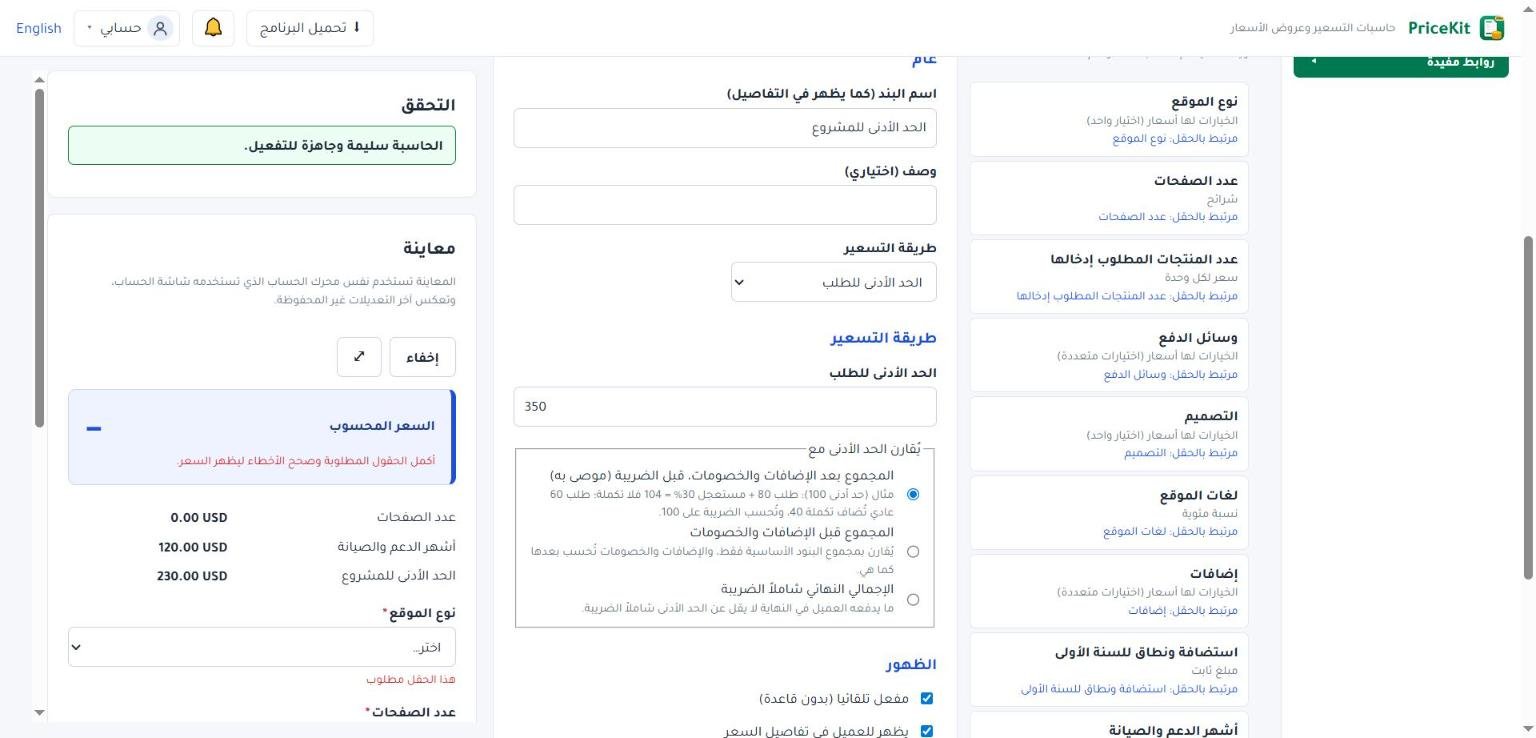
لا تحتاج اختيار المرحلة لهذا البند، فـPriceKit يضعها تلقائيًا حسب الأساس الذي تختاره. ويُسمح ببند واحد فقط للحد الأدنى في كل حاسبة، ويجب أن يكون المبلغ أكبر من صفر.
الأسس الثلاثة بمثال
في الأمثلة: الحد الأدنى $100، ورسوم استعجال 30% من المجموع الأساسي، وضريبة 15% من المجموع بعد الإضافات والخصومات. انظر ترتيب الحساب.
1. المجموع بعد الإضافات والخصومات، قبل الضريبة (موصى به)
هذا الخيار محدد تلقائيًا. يُقارن الحد الأدنى بالمجموع بعد الإضافات والخصومات، وتُضاف التكملة قبل الضريبة، فتُحسب الضريبة عليها أيضًا.
- طلب $80 مستعجل: 80 + 24 = 104، فلا تكملة. الضريبة $15.60، والسعر $119.60.
- طلب $60 عادي: تكملة $40 فيصبح 100. الضريبة $15، والسعر $115.
2. المجموع قبل الإضافات والخصومات
يُقارن بمجموع البنود الأساسية فقط، ثم تُحسب الإضافات والخصومات بعدها كالمعتاد على المجموع الأساسي دون التكملة.
- طلب $60 مستعجل: تكملة $40، والاستعجال 30% من 60 = $18، فالمجموع $118. الضريبة $17.70، والسعر $135.70.
3. الإجمالي النهائي شاملاً الضريبة
ما يدفعه العميل في النهاية لا يقل عن الحد الأدنى شاملًا الضريبة. تُضاف التكملة بعد الضريبة، فلا تُحسب عليها ضريبة.
- طلب $60 عادي: الضريبة $9 فيصبح 69، ثم تكملة $31، والسعر $100.
أيها تختار؟
الخيار الأول يناسب معظم الأعمال: يغطي تكلفة الطلب الصغير، والضريبة تبقى محسوبة بالطريقة المعتادة. اختر الثاني إن كان حدك الأدنى يخص الخدمة نفسها قبل أي رسوم، والثالث إن أردت رقمًا نهائيًا ثابتًا يدفعه العميل مهما كانت الضريبة.
جرّب الحد الأدنى في معاينة المحرر بطلب صغير وطلب كبير قبل التفعيل، لتتأكد أن السطر يظهر فقط عند الحاجة.
Keep every job above an amount you set, and choose what the minimum is compared with: before tax (recommended), before additions, or the final total.
A minimum order makes sure no job is priced below an amount you choose, such as $100 however small the job. When the price is lower, PriceKit adds the difference as its own line in the breakdown, so the lines always add up to the price. When the price already reaches the minimum, the line does not appear. A minimum never lowers a price.
Add a minimum
- On the Pricing tab, click Add price item.
- Name the item the way the customer should see it, for example “Minimum order top-up”.
- Set the Pricing method to Minimum order.
- Enter the amount in Minimum order, for example 100.
- Under The minimum is compared with, choose one of the three bases explained below.
You do not choose a Stage for this item; PriceKit sets it from the basis you pick. Only one minimum order item is allowed per calculator, and the amount must be above zero.
The three bases, with examples
In these examples the minimum is $100, there is a 30% rush fee on the base subtotal, and a 15% tax on the subtotal after surcharges and discounts. See the order of calculation.
1. The total after additions and discounts, before tax (recommended)
This one is preselected. The minimum is compared with the total after surcharges and discounts; the top-up is added before tax, so tax is charged on it too.
- An $80 rush job: 80 + 24 = 104, so no top-up. Tax $15.60, price $119.60.
- A $60 normal job: a $40 top-up brings it to 100. Tax $15, price $115.
2. The total before additions and discounts
Compared with the base items only; surcharges and discounts are then charged as usual on the base subtotal, without the top-up.
- A $60 rush job: a $40 top-up, and the rush fee is 30% of 60 = $18, so the subtotal is $118. Tax $17.70, price $135.70.
3. The final total including tax
What the customer pays in the end is never below the minimum, tax included. The top-up is added after tax, so no tax is charged on it.
- A $60 normal job: $9 tax makes 69, then a $31 top-up, price $100.
Which one should you pick?
The first suits most businesses: small jobs cover their cost and tax is still worked out the usual way. Pick the second if your minimum is about the service itself before any fees, and the third if you want a fixed final figure the customer pays whatever the tax.
Before activating, test the minimum in the builder’s Preview with a small job and a large one, to check that the line appears only when needed.
لم تجد جوابك؟Didn’t find your answer?
اطّلع على الأسئلة الشائعة، أو جرّب قالباً جاهزاً، أو راسلنا وسنرد عليك في أقرب وقت.See the FAQ, try a ready template, or write to us and we will answer as soon as we can.
الأسئلة الشائعةFAQ مكتبة القوالبTemplate library تواصل معناContact us