
أنشئ مفتاحاً سرياً أو مفتاح موقع، واستخدم API v1 لقراءة الحاسبات وحساب السعر وإرسال طلبات العملاء.
مفاتيح الـ API تربط حاسباتك ببرامجك أو بواجهة تبنيها بنفسك: تقرأ الحاسبة، وتحسب السعر، وترسل طلبات العملاء إلى PriceKit. السعر يُحسب دائماً على خادم PriceKit، ولا تصل المعادلات أو الأسعار المخفية إلى المتصفح. الميزة ضمن الاشتراك الاحترافي، والفترة التجريبية تشملها.
كود التضمين العادي لا يحتاج أي مفتاح. المفاتيح لإضافة ووردبريس ولمن يبني واجهته بنفسه. انظر الحاسبة على موقعك وإضافة ووردبريس.
نوعا المفاتيح
| النوع | أين يُستخدم | ماذا يستطيع |
|---|---|---|
مفتاح سري (sk_…) |
خادم موقعك أو إضافة ووردبريس فقط | كل شيء: القائمة، النموذج، الحساب، إرسال الطلبات، السعر الموقّع |
مفتاح الموقع (pk_…) |
المتصفح، من نطاقاتك المسجّلة فقط (https) | القائمة والنموذج والحساب فقط، ولا يرسل طلبات |
لا تضع المفتاح السري أبداً في صفحة يراها الزوار أو في كود JavaScript.
أنشئ مفتاحاً
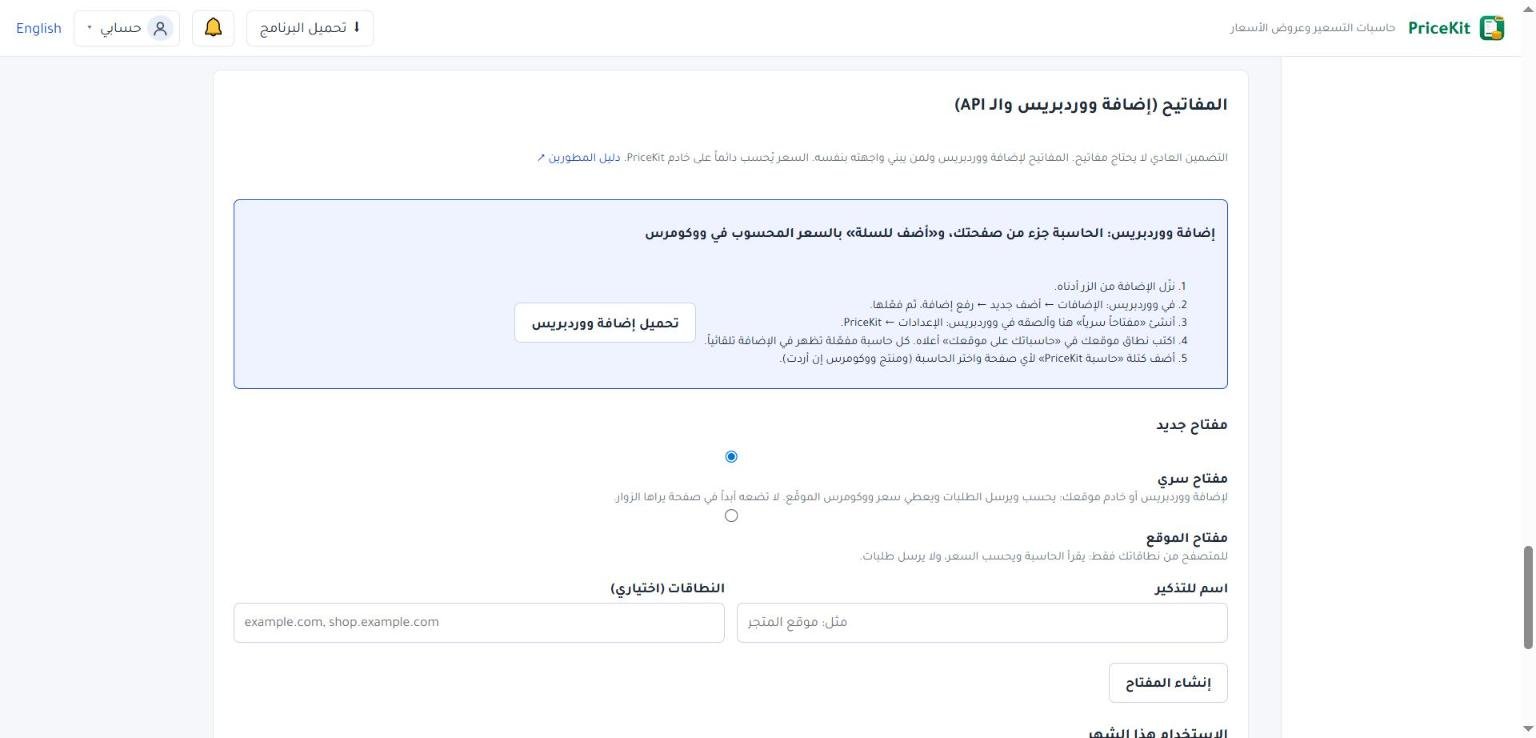
- في تطبيق الويب افتح موقعك والـ API، ثم قسم المفاتيح (إضافة ووردبريس والـ API).
- تحت مفتاح جديد اختر مفتاح سري أو مفتاح الموقع.
- اكتب اسم للتذكير، مثل «موقع المتجر».
- اكتب النطاقات مفصولة بفاصلة، مثل
example.com, shop.example.com. هي مطلوبة لمفتاح الموقع. - اضغط إنشاء المفتاح، ثم نسخ.
المفتاح السري يظهر مرة واحدة فقط. إن فقدته فألغِه وأنشئ غيره.
يعرض الجدول كل مفاتيحك مع آخر استخدام. زر إلغاء يوقف فوراً كل موقع يستخدم المفتاح. ويعرض قسم الاستخدام هذا الشهر مرات الظهور والحساب والطلبات لكل موقع.
عنوان الـ API والمصادقة
العنوان: https://pricekit-clients.ghosounmedia.com/v1، والبيانات JSON بترميز UTF-8. أرسل المفتاح السري في الترويسة Authorization: Bearer sk_…، ومفتاح الموقع في X-PriceKit-Key: pk_….
| الطلب | ماذا يفعل |
|---|---|
GET /v1/calculators |
حاسبات موقعك: كل حاسبة مفعّلة تلقائياً، وروابط «على موقعي». |
GET /v1/calculators/{id}?lang=ar |
النموذج: الحقول والخيارات وبيانات التواصل والنصوص، بلا معادلات. |
POST /v1/calculators/{id}/calculate |
حالة الحقول، وأسعار الخيارات إن سمحت بها، والسعر النهائي عند طلبه. |
POST /v1/calculators/{id}/requests |
إرسال طلب عميل (المفتاح السري فقط)، فيصل إلى طلبات العملاء. |
POST /v1/calculators/{id}/price |
سعر موقّع لووكومرس أو متجرك (المفتاح السري فقط). |
GET /v1/public-key |
المفتاح العام للتحقق من السعر الموقّع. |
المعرّف id هو الذي تعيده قائمة الحاسبات.
أمثلة
1. قائمة الحاسبات
curl -H "Authorization: Bearer sk_…" https://pricekit-clients.ghosounmedia.com/v1/calculators

[
  {"id": "3f2a…", "name": "Home cleaning", "language": "en",
   "showsFinalPrice": true, "publication": 3}
]
2. نموذج الحاسبة
curl -H "Authorization: Bearer sk_…" "https://pricekit-clients.ghosounmedia.com/v1/calculators/3f2a…?lang=en"

{"id": "3f2a…", "title": "Home cleaning", "language": "en", "otherLanguages": ["ar"],
 "currency": "USD", "moneyDecimals": 2, "showsOptionPrices": true, "showsFinalPrice": true,
 "fields": [{"key": "type", "label": "Home type", "type": "single", "required": true,
             "options": [{"key": "apartment", "label": "Apartment", "price": "150.00 USD"},
                         {"key": "villa", "label": "Villa", "price": "400.00 USD"}],
             "visible": true, "enabled": true, …},
            {"key": "rooms", "label": "Extra rooms", "type": "number", …}],
 "contact": [{"field": "Name", "requirement": "required", "label": "Name"},
             {"field": "Phone", "requirement": "required", "label": "Phone number"},
             {"field": "Email", "requirement": "optional", "label": "E-mail"}],
 "sendText": "Send request", "calculateText": "Calculate price", "poweredBy": false, …}
3. حساب السعر
الإجابات: نص، أو رقم كنص («12.5»)، أو true/false، أو مفتاح الخيار للاختيار الواحد، أو مصفوفة مفاتيح للاختيار المتعدد، والتاريخ بالشكل yyyy-MM-dd. ضع requestPrice: true لتحصل على السعر النهائي.
curl -H "Authorization: Bearer sk_…" -H "Content-Type: application/json"
  -d '{"answers":{"type":"apartment","rooms":"1"},"requestPrice":true,"language":"en"}'
  https://pricekit-clients.ghosounmedia.com/v1/calculators/3f2a…/calculate

{"fields": [{"key": "type", "visible": true, "enabled": true}, …],
 "issues": [],
 "optionPrices": [{"field": "type", "option": "villa", "text": "400.00 USD"}, …],
 "price": {"total": "190.00 USD", "delivery": null, "disclaimer": null},
 "priceMessage": null}
4. إرسال طلب عميل
أرسل عنوان الزائر (visitor.ip) والزمن منذ عرض النموذج بالمللي ثانية (elapsedMs)، واترك الحقل website فارغاً. الطلب الذي يصل قبل ثانيتين من عرض النموذج يُعدّ آلياً ويُرفض. idempotencyKey يمنع تسجيل الطلب نفسه مرتين.
curl -H "Authorization: Bearer sk_…" -H "Content-Type: application/json"
  -d '{"answers":{"type":"apartment","rooms":"1"},
       "contact":{"name":"Samer","phone":"0599123456","email":"samer@example.com"},
       "language":"en","idempotencyKey":"9f1c…","priceShown":true,
       "elapsedMs":42000,"visitor":{"ip":"203.0.113.5"}}'
  https://pricekit-clients.ghosounmedia.com/v1/calculators/3f2a…/requests

{"number": "1C41F42E",
 "receiptUrl": "https://pricekit-clients.ghosounmedia.com/…",
 "after": {"message": "Thank you, we received your request and will contact you soon.",
           "redirectUrl": null, "delaySeconds": 0, "number": "1C41F42E"}}
5. السعر الموقّع
يعمل فقط إذا كانت الحاسبة تُظهر السعر النهائي. التوقيع صالح ساعتين، وتتحقق منه على خادمك بالمفتاح العام من /v1/public-key. التفاصيل في دليل المطورين.
curl -H "Authorization: Bearer sk_…" -H "Content-Type: application/json"
  -d '{"answers":{"type":"apartment","rooms":"1"},"language":"en"}'
  https://pricekit-clients.ghosounmedia.com/v1/calculators/3f2a…/price

{"payload": "{"v":1,"calculator":"3f2a…","total":"190.00",…}",
 "signature": "MEUCIQ…", "total": 190.00, "currency": "USD", "moneyDecimals": 2,
"display": "190.00 USD", "expiresAt": "2026-11-11T12:00:00+00:00"}الأخطاء
| HTTP | error | المعنى |
|---|---|---|
| 401 | invalid_key |
مفتاح غير صحيح أو ملغى، أو نوع مفتاح خاطئ. |
| 403 | origin_not_allowed |
مفتاح الموقع استُخدم من نطاق غير مسجّل. |
| 403 | secret_key_required |
العملية تحتاج المفتاح السري. |
| 403 | unavailable |
الحاسبات متوقفة (الاشتراك أو إيقاف من الإدارة). |
| 404 | not_found |
لا توجد حاسبة نشطة بهذا المعرّف في حسابك. |
| 400 | invalid |
أخطاء في الإجابات أو بيانات التواصل (issues: الحقل والرسالة). |
| 409 | price_hidden |
الحاسبة لا تُظهر السعر النهائي، فلا سعر موقّع. |
| 429 | rejected |
أوقفته الحماية من الإرسال الآلي أو المتكرر. |
الحدود والحماية
- لا حصة ظاهرة: الحاسبات والزوار ومرات الحساب والطلبات غير محدودة ضمن الاستخدام العادل في شروط PriceKit.
- حد عام سخي لكل عنوان متصل: 1200 طلب في الدقيقة، وبعده رد 429.
- حجم الطلب حتى 256 كيلوبايت.
- إرسال الطلبات محمي بحماية خفية: حقل فخ، وأقل زمن لتعبئة النموذج، وحد لكل زائر، وسقف يومي لكل موقع.
- مفتاح الموقع يعمل فقط من صفحات https على نطاقاته، ويرى حاسبات تلك النطاقات فقط.
- بعد انتهاء اشتراك مدفوع تبقى حاسبات موقعك والـ API تعمل 7 أيام، ثم يرفض الـ API بالخطأ
unavailableحتى التجديد. لا يُحذف شيء.
لاستقبال كل طلب جديد في نظامك تلقائياً انظر Webhooks.
Create a secret or site key and use API v1 to read calculators, calculate prices and send customer requests.
API keys connect your calculators to your own software or a front end you build yourself: read a calculator, calculate the price, and send customer requests to PriceKit. The price is always calculated on PriceKit’s server; formulas and hidden prices never reach a browser. The feature is part of the Professional subscription, and the trial includes it.
The ordinary embed code needs no key. Keys are for the WordPress plugin and for developers who build their own front end. See Calculator on your website and WordPress plugin.
The two kinds of keys
| Kind | Where it is used | What it can do |
|---|---|---|
Secret key (sk_…) |
Your site’s server or the WordPress plugin only | Everything: list, form, calculate, send requests, signed price |
Site key (pk_…) |
Browsers on your registered domains only (https) | List, form and calculate only; it never sends requests |
Never put the secret key in a page visitors see or in JavaScript.
Create a key
- In the Web App, open Website & API, then the Keys (WordPress plugin and API) section.
- Under New key, choose Secret key or Site key.
- Enter a Name to remember, such as “Shop website”.
- Enter the domains separated by commas, such as
example.com, shop.example.com. They are required for a site key. - Press Create key, then Copy.
A secret key is shown only once. If you lose it, revoke it and create another.
The table lists your keys with their Last used date. Revoke stops every site that uses the key at once. The Usage this month section shows views, calculations and customer requests per site.
API address and authentication
Address: https://pricekit-clients.ghosounmedia.com/v1, JSON in UTF-8. Send a secret key in the Authorization: Bearer sk_… header and a site key in X-PriceKit-Key: pk_….
| Request | What it does |
|---|---|
GET /v1/calculators |
Your website calculators: every active calculator automatically, plus “On my website” links. |
GET /v1/calculators/{id}?lang=en |
The form: fields, options, contact fields and texts, with no formulas. |
POST /v1/calculators/{id}/calculate |
Field states, option prices when allowed, and the final price on request. |
POST /v1/calculators/{id}/requests |
Send a customer request (secret key only); it reaches Customer requests. |
POST /v1/calculators/{id}/price |
A signed price for WooCommerce or your shop (secret key only). |
GET /v1/public-key |
The public key that checks signed prices. |
The id is the one returned by the calculators list.
Examples
1. List calculators
curl -H "Authorization: Bearer sk_…" https://pricekit-clients.ghosounmedia.com/v1/calculators

[
  {"id": "3f2a…", "name": "Home cleaning", "language": "en",
   "showsFinalPrice": true, "publication": 3}
]
2. Get a calculator’s form
curl -H "Authorization: Bearer sk_…" "https://pricekit-clients.ghosounmedia.com/v1/calculators/3f2a…?lang=en"

{"id": "3f2a…", "title": "Home cleaning", "language": "en", "otherLanguages": ["ar"],
 "currency": "USD", "moneyDecimals": 2, "showsOptionPrices": true, "showsFinalPrice": true,
 "fields": [{"key": "type", "label": "Home type", "type": "single", "required": true,
             "options": [{"key": "apartment", "label": "Apartment", "price": "150.00 USD"},
                         {"key": "villa", "label": "Villa", "price": "400.00 USD"}],
             "visible": true, "enabled": true, …},
            {"key": "rooms", "label": "Extra rooms", "type": "number", …}],
 "contact": [{"field": "Name", "requirement": "required", "label": "Name"},
             {"field": "Phone", "requirement": "required", "label": "Phone number"},
             {"field": "Email", "requirement": "optional", "label": "E-mail"}],
 "sendText": "Send request", "calculateText": "Calculate price", "poweredBy": false, …}
3. Calculate the price
Answers: text, a number as text (“12.5”), true/false, the option key for a single choice, an array of keys for multiple choice, and dates as yyyy-MM-dd. Set requestPrice: true to get the final price.
curl -H "Authorization: Bearer sk_…" -H "Content-Type: application/json"
  -d '{"answers":{"type":"apartment","rooms":"1"},"requestPrice":true,"language":"en"}'
  https://pricekit-clients.ghosounmedia.com/v1/calculators/3f2a…/calculate

{"fields": [{"key": "type", "visible": true, "enabled": true}, …],
 "issues": [],
 "optionPrices": [{"field": "type", "option": "villa", "text": "400.00 USD"}, …],
 "price": {"total": "190.00 USD", "delivery": null, "disclaimer": null},
 "priceMessage": null}
4. Send a customer request
Pass the visitor’s address (visitor.ip) and the milliseconds since the form was shown (elapsedMs), and leave the website field empty. A request sent less than two seconds after the form was shown is treated as automated and refused. idempotencyKey prevents the same request from being stored twice.
curl -H "Authorization: Bearer sk_…" -H "Content-Type: application/json"
  -d '{"answers":{"type":"apartment","rooms":"1"},
       "contact":{"name":"Samer","phone":"0599123456","email":"samer@example.com"},
       "language":"en","idempotencyKey":"9f1c…","priceShown":true,
       "elapsedMs":42000,"visitor":{"ip":"203.0.113.5"}}'
  https://pricekit-clients.ghosounmedia.com/v1/calculators/3f2a…/requests

{"number": "1C41F42E",
 "receiptUrl": "https://pricekit-clients.ghosounmedia.com/…",
 "after": {"message": "Thank you, we received your request and will contact you soon.",
           "redirectUrl": null, "delaySeconds": 0, "number": "1C41F42E"}}
5. Signed price
Works only when the calculator shows its final price. The signature is valid for two hours; check it on your server with the public key from /v1/public-key. Details are in the developer guide.
curl -H "Authorization: Bearer sk_…" -H "Content-Type: application/json"
  -d '{"answers":{"type":"apartment","rooms":"1"},"language":"en"}'
  https://pricekit-clients.ghosounmedia.com/v1/calculators/3f2a…/price

{"payload": "{"v":1,"calculator":"3f2a…","total":"190.00",…}",
 "signature": "MEUCIQ…", "total": 190.00, "currency": "USD", "moneyDecimals": 2,
"display": "190.00 USD", "expiresAt": "2026-11-11T12:00:00+00:00"}Errors
| HTTP | error | Meaning |
|---|---|---|
| 401 | invalid_key |
Wrong or revoked key, or the wrong kind of key. |
| 403 | origin_not_allowed |
A site key was used from an unregistered domain. |
| 403 | secret_key_required |
The operation needs the secret key. |
| 403 | unavailable |
Calculators are paused (subscription or administrator). |
| 404 | not_found |
No active calculator with this id in your account. |
| 400 | invalid |
Errors in the answers or contact data (issues: field and message). |
| 409 | price_hidden |
The calculator does not show its final price, so there is no signed price. |
| 429 | rejected |
Stopped by the protection against automated or repeated sending. |
Limits and protection
- No visible quota: calculators, visitors, calculations and requests are unlimited within the fair use of the PriceKit terms.
- A generous general limit per calling address: 1200 requests a minute, then a 429 answer.
- Request bodies up to 256 KB.
- Sending requests has invisible protection: a honeypot field, a minimum time to fill the form, a per-visitor limit and a daily ceiling per site.
- A site key works only from https pages on its domains, and only sees those domains’ calculators.
- After a paid subscription ends, your website calculators and the API keep working for 7 days; then the API answers
unavailableuntil you renew. Nothing is deleted.
To receive every new request in your system automatically, see Webhooks.
لم تجد جوابك؟Didn’t find your answer?
اطّلع على الأسئلة الشائعة، أو جرّب قالباً جاهزاً، أو راسلنا وسنرد عليك في أقرب وقت.See the FAQ, try a ready template, or write to us and we will answer as soon as we can.
الأسئلة الشائعةFAQ مكتبة القوالبTemplate library تواصل معناContact us