
أرسل حاسبتك لعميل محدد أو للجميع برابط، واختر ما يراه من أسعار والبيانات التي تطلبها منه.
بدل أن ترسل للعميل جدول أسعار أو تحسب له السعر يدويًا، شارك معه الحاسبة نفسها برابط. يفتح العميل الرابط من هاتفه أو حاسوبه دون تثبيت أي شيء، يختار ما يناسبه، ثم يرى السعر أو يرسل طلبه إليك للمراجعة.
قبل أن تبدأ
- يجب أن تكون الحاسبة مفعّلة؛ زر مشاركة مع العميل يظهر للحاسبات المفعّلة فقط (راجع حالات الحاسبة).
- يجب أن يكون بريد حسابك مؤكدًا، فلا يمكن مشاركة الحاسبات قبل تأكيده.
أنشئ الرابط
- افتح صفحة الحاسبات واضغط مشاركة مع العميل بجانب الحاسبة. (أو من صفحة طلبات العملاء ← تبويب الروابط ← رابط مشاركة جديد ثم اختر الحاسبة.)
- في نوع الرابط اختر رابط لعميل محدد ثم اختر العميل، أو اختر رابط عام.
- اكتب إن شئت اسم داخلي للرابط (اختياري) يساعدك على تمييزه، مثل «إعلان إنستغرام». العميل لا يراه.
- اضبط ما يراه العميل وبيانات التواصل واللغة (الشرح أدناه).
- اضغط معاينة كما يراها العميل لترى الصفحة كما ستظهر له؛ لا يُرسل منها أي شيء.
- اضغط نشر وإنشاء الرابط.
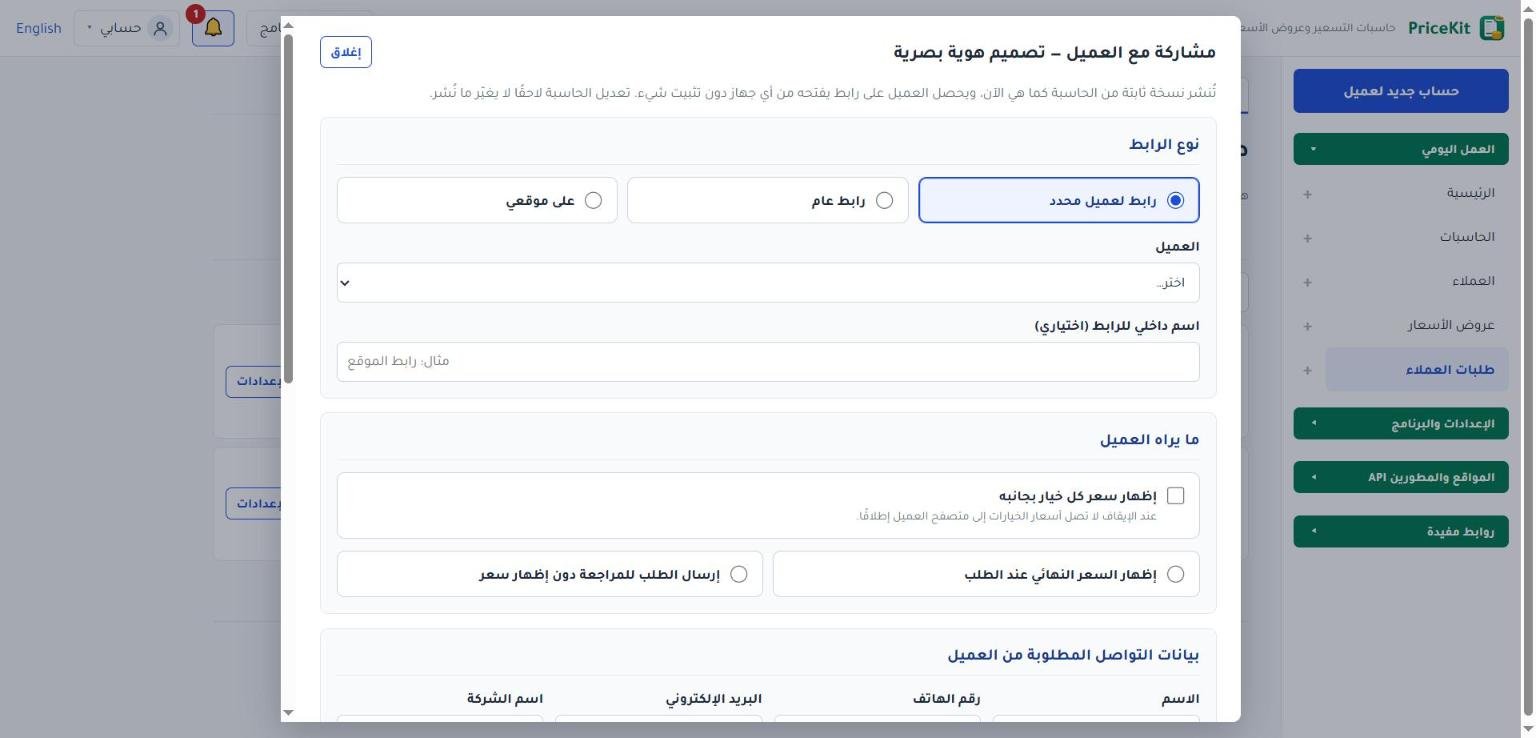
رابط لعميل محدد أم رابط عام؟
| النوع | متى تستخدمه |
|---|---|
| رابط لعميل محدد | لعميل موجود في قائمة عملائك. طلبه يُربط به مباشرة، ولذلك لا يُطلب منه أي بيانات تواصل افتراضيًا. |
| رابط عام | لأي شخص: في حسابك على إنستغرام أو في رسالة جماعية. افتراضيًا يُطلب الاسم ورقم الهاتف، والبريد اختياري. |
أما النوع الثالث على موقعي فخاص بعرض الحاسبة داخل موقعك؛ اقرأ حاسباتك على موقعك.
ما يراه العميل
- إظهار سعر كل خيار بجانبه: يظهر بجانب كل خيار المبلغ الذي يضيفه فعلًا مع اختيارات العميل الحالية. عند الإيقاف لا تصل أسعار الخيارات إلى متصفح العميل إطلاقًا.
- إظهار السعر النهائي عند الطلب: يضغط العميل احسب السعر فيرى السعر النهائي، ومدة التسليم المتوقعة إن جعلتها الحاسبة ظاهرة للعميل. يمكنك إضافة نص تنبيه مع السعر (اختياري) مثل «السعر تقديري ويُعتمد بعد التواصل».
- إرسال الطلب للمراجعة دون إظهار سعر: يرسل العميل إجاباته، فتراجعها أنت وترسل له السعر لاحقًا.
مثال: شركة تنظيف تشارك حاسبة «تنظيف شقة» مع السعر النهائي ظاهرًا. يختار العميل 3 غرف وتنظيف المطبخ فيرى مباشرة $85 ثم يرسل طلبه.
بيانات التواصل
في بيانات التواصل المطلوبة من العميل تحدد لكل بند (الاسم، رقم الهاتف، البريد الإلكتروني، اسم الشركة، ملاحظة) إحدى الحالات: لا يُطلب أو اختياري أو إلزامي.
صفحة العميل واللغة
- لغة الصفحة: العربية أو الإنجليزية، مع خيار السماح للعميل بتغيير لغة الصفحة.
- نص الخصوصية (اختياري) ورابط سياسة الخصوصية (اختياري) (يبدأ بـ https://).
- صالح حتى (اختياري) وأقصى عدد للطلبات (اختياري): بعد التاريخ أو بعد بلوغ العدد يتوقف الرابط ويرى العميل أنه لم يعد متاحًا.
بعد إنشاء الرابط
يظهر الرابط مع أزرار نسخ الرابط وفتح الرابط ومشاركة عبر واتساب ورمز QR يمكنك طباعته.
انسخ الرابط فورًا: لا يُعرض عنوانه كاملًا مرة أخرى إلا على الجهاز الذي أنشأه. إن فقدته استخدم استبدال الرابط.
إدارة الروابط وتحديثها
عند المشاركة تُنشر نسخة ثابتة من الحاسبة كما هي الآن، فتعديلك للحاسبة لاحقًا لا يغيّر ما يراه العميل. من صفحة طلبات العملاء ← تبويب الروابط تجد لكل رابط عدد مرات الفتح وحساب السعر والطلبات، وهذه الأزرار:
- تعديل الإعدادات: تغيير إعدادات الرابط.
- تحديث إلى أحدث إصدار: ينشر الحاسبة كما هي الآن ويصبح الرابط عليها. الطلبات السابقة تبقى على الإصدار الذي استخدمته.
- استبدال الرابط: ينشئ عنوانًا جديدًا ويتوقف القديم فورًا.
- إيقاف الرابط: لن يتمكن أحد من فتحه بعد الآن، والطلبات السابقة تبقى كما هي.
أرشفة الحاسبة لا توقف روابطها تلقائيًا؛ يعرض البرنامج الروابط النشطة ويسألك إن كنت تريد إيقافها.
الخطوات نفسها تعمل في برنامج PriceKit لويندوز. لمتابعة ما يصلك من طلبات اقرأ طلبات العملاء.
Send your calculator to one customer or to anyone by link, and choose which prices they see and which details you ask for.
Share the calculator itself as a link instead of a price list. Your customer opens it on any phone or computer without installing anything, picks what they need, and either sees the price or sends the request to you for review.
Before you start
- The calculator must be active: the Share with customer button appears only for active calculators (see Calculator status).
- Your account e-mail must be confirmed; calculators cannot be shared before that.
Create the link
- Open Calculators and press Share with customer next to the calculator. (Or go to Customer requests → Links tab → New share link and choose the calculator.)
- Under Link type, choose Link for a specific customer and pick the Customer, or choose Public link.
- Optionally fill in Internal name of the link (optional), such as “Instagram ad”. Customers never see it.
- Set what the customer sees, the contact details and the language (explained below).
- Press Preview as customer to see the page as your customer will (nothing is sent).
- Press Publish and create the link.
Customer link or public link?
| Type | Use it for |
|---|---|
| Link for a specific customer | A customer in your list. Their request is linked to them, so by default nothing is asked. |
| Public link | Anyone: your Instagram bio, a broadcast message. By default name and phone are required and e-mail is optional. |
The third type, On my website, puts the calculator inside your own site; see Your calculators on your website.
What the customer sees
- Show the price next to each option: each option shows the amount it really adds with the customer’s current answers. When off, option prices never reach the customer’s browser.
- Show the final price on request: the customer presses Calculate price and sees the final price, plus the expected delivery time if the calculator makes it visible to customers. You can add a Note shown with the price (optional), e.g. “The price is an estimate, confirmed after we talk”.
- Send the request for review without showing a price: the customer sends their answers; you review them and send the price later.
Example: a cleaning company shares its “Apartment cleaning” calculator with the final price shown. A customer picks 3 rooms plus kitchen cleaning, sees $85 right away and sends the request.
Contact details
Under Contact details asked from the customer, set each item (Name, Phone number, E-mail, Company name, Note) to Not asked, Optional or Required.
Customer page and language
- Page language: Arabic or English, with Let the customer switch the page language.
- Privacy note (optional) and Privacy policy link (optional) (must start with https://).
- Valid until (optional) and Maximum number of requests (optional): after that date or number the link stops and customers are told it is no longer available.
After the link is created
You get the link with Copy link, Open link and Share via WhatsApp, plus a QR code you can print.
Copy the link now: its full address is shown again only on the device that created it. If you lose it, use Replace link.
Managing and updating links
Sharing publishes a fixed copy of the calculator as it is now, so later edits do not change what customers see. On Customer requests → Links each link shows its views, price requests and requests, and these buttons:
- Edit settings: change the link’s settings.
- Update to latest version: publishes the calculator as it is now and moves the link to it. Earlier requests keep the version they used.
- Replace link: creates a new address; the old one stops at once.
- Disable link: nobody can open it any more; earlier requests stay as they are.
Archiving a calculator does not stop its links by itself: PriceKit lists the active links and asks whether to disable them.
The same steps work in the PriceKit program for Windows. To handle what comes in, read Customer requests.
لم تجد جوابك؟Didn’t find your answer?
اطّلع على الأسئلة الشائعة، أو جرّب قالباً جاهزاً، أو راسلنا وسنرد عليك في أقرب وقت.See the FAQ, try a ready template, or write to us and we will answer as soon as we can.
الأسئلة الشائعةFAQ مكتبة القوالبTemplate library تواصل معناContact us