
أرسل كل طلب عميل جديد فوراً إلى Zapier أو Make أو Google Sheets أو نظامك، برسائل موقّعة وإعادة محاولة تلقائية.
الـ Webhook يرسل كل طلب عميل جديد فوراً إلى نظام آخر تختاره: Google Sheets أو Zapier أو Make أو نظام CRM أو خادمك. يشمل ذلك الطلبات من موقعك ومن أي رابط مشاركة (عام أو لعميل محدد). كل رسالة موقّعة، وتُعاد المحاولة تلقائياً إن لم يستجب النظام الآخر.
أضف عنواناً
- في تطبيق الويب افتح موقعك والـ API، ثم قسم Webhooks — إرسال الطلبات لأنظمة أخرى.
- في عنوان الاستقبال (https) ألصق عنوان نظامك، مثل عنوان Catch Hook من Zapier.
- اضغط إضافة. يظهر مفتاح التوقيع؛ اضغط نسخ واحفظه في نظامك.
- اضغط إرسال تجربة: تصل رسالة تجربة، ويظهر لك رد النظام الآخر.
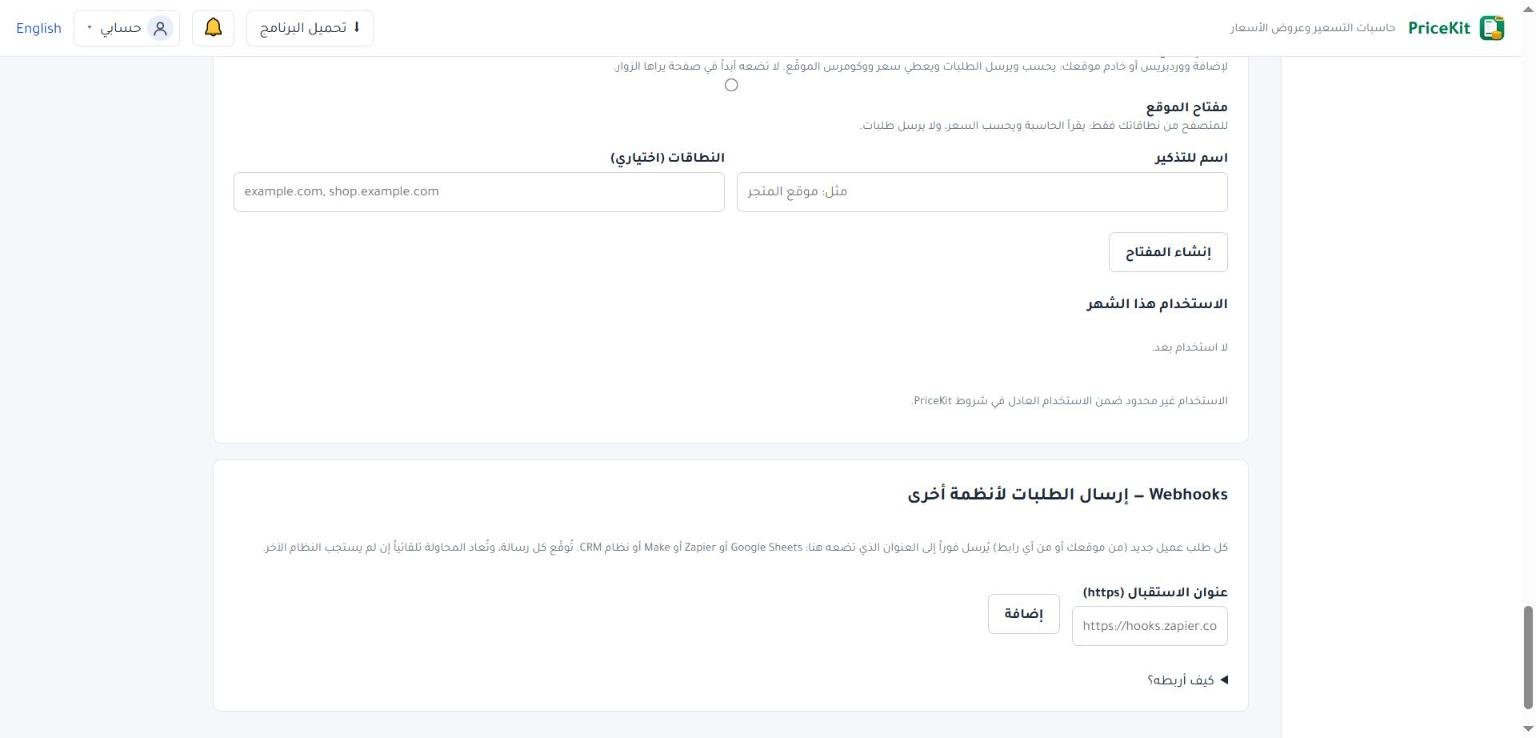
لكل عنوان أزرار: مفتاح التوقيع لعرض المفتاح مرة أخرى، وإيقاف مؤقت وتشغيل، وحذف. وتحت العنوان آخر نتيجة إرسال، ناجحة أو فاشلة مع السبب.
- العنوان يجب أن يبدأ بـ https:// وأن يكون عنواناً عاماً على الإنترنت، لا عنواناً داخلياً.
- حتى 10 عناوين لكل حساب، ويصل كل طلب إلى كل عنوان مفعّل.
- الحساب الذي صار للقراءة فقط لا يستطيع إضافة عناوين.
مع Zapier أنشئ Zap بمشغّل «Webhooks by Zapier ← Catch Hook»، ومع Make أضف وحدة «Webhooks ← Custom webhook». ثم اضغط إرسال تجربة ليتعرف على شكل البيانات. لـ Google Sheets أسهل طريق عبر Zapier أو Make بخطوة «أضف صفاً».
الأحداث
| الحدث | متى يُرسل |
|---|---|
request.created |
عند كل طلب عميل جديد يُحفظ في PriceKit. |
ping |
عند الضغط على إرسال تجربة فقط. |
شكل الرسالة
طلب POST بـ JSON مع هذه الترويسات:
POST https://your-system.example.com/pricekit
Content-Type: application/json; charset=utf-8
User-Agent: PriceKit-Webhooks/1.0
X-PriceKit-Event: request.created
X-PriceKit-Delivery: 7b0e…
X-PriceKit-Signature: t=1767225600,v1=5d41402abc…
جسم الرسالة لحدث request.created:
{
  "id": "7b0e…",
  "event": "request.created",
  "createdAt": "2026-11-11T09:30:00.0000000+00:00",
  "data": {
    "request": {
      "id": "1c41f42e-…",
      "number": "1C41F42E",
      "status": "New",
      "createdAt": "2026-11-11T09:30:00.0000000+00:00",
      "calculator": "Home cleaning",
      "publication": 3,
      "link": { "id": "…", "kind": "website", "label": null },
      "language": "en",
      "contact": { "name": "Samer", "phone": "0599123456", "email": "samer@example.com",
                   "companyName": null, "note": null },
      "answers": [
        { "field": "type", "label": "Home type", "value": "Apartment" },
        { "field": "rooms", "label": "Extra rooms", "value": "1" }
      ],
      "price": { "total": "190.00", "currency": "USD", "display": "190.00 USD" },
      "receiptUrl": "https://pricekit-clients.ghosounmedia.com/…"
    }
  }
}priceهو السعر الذي رآه العميل، ويكونnullإذا أُرسل الطلب للمراجعة دون سعر.- الإجابات مكتوبة كما تظهر بلغة الطلب، وحقول التواصل التي لم يطلبها الرابط تكون
null. link.kindهوwebsiteأوpublicأوcustomer.
رسالة التجربة:
{ "id": "…", "event": "ping", "createdAt": "…", "data": { "message": "PriceKit test" } }التحقق من التوقيع
الترويسة X-PriceKit-Signature بالشكل t=…,v1=…، حيث t وقت الإرسال بالثواني، وv1 هو HMAC-SHA256 بمفتاح التوقيع على النص t + "." + جسم الرسالة، بصيغة hex. احسبه على الجسم كما وصل حرفياً قبل أي تحويل، وقارن بطريقة ثابتة الزمن. التحقق اختياري في Zapier وMake.
// Node.js (Express: read the raw body, e.g. express.raw({ type: 'application/json' }))
const crypto = require('crypto');
function isFromPriceKit(header, rawBody, secret) {
  const parts = Object.fromEntries(header.split(',').map(p => p.split('=')));
  const expected = crypto.createHmac('sha256', secret)
    .update(parts.t + '.' + rawBody).digest('hex');
  return typeof parts.v1 === 'string' && parts.v1.length === expected.length
    && crypto.timingSafeEqual(Buffer.from(parts.v1), Buffer.from(expected));
}

// PHP
$body = file_get_contents('php://input');
parse_str(str_replace(',', '&', $_SERVER['HTTP_X_PRICEKIT_SIGNATURE'] ?? ''), $p);
$expected = hash_hmac('sha256', ($p['t'] ?? '') . '.' . $body, $secret);
$ok = isset($p['v1']) && hash_equals($expected, $p['v1']);
إعادة المحاولة
- يُعدّ الإرسال ناجحاً إذا ردّ نظامك بأي رمز 2xx خلال 10 ثوانٍ. لا تُتبع إعادات التوجيه.
- عند الفشل تُعاد المحاولة بعد 1 ثم 2 ثم 4 ثم 8 ثم 16 ثم 32 ثم 64 دقيقة: 8 محاولات في نحو ساعتين، ثم يتوقف الإرسال لهذه الرسالة.
- الترويسة
X-PriceKit-Deliveryوidفي الجسم لا يتغيران بين المحاولات، فاستخدمهما لتجاهل الرسالة المكررة. - إذا أوقفت العنوان مؤقتاً تبقى الطلبات الجديدة محفوظة بانتظاره، وتُرسل كلها فور الضغط على تشغيل.
يبقى كل طلب محفوظاً في طلبات العملاء سواء نجح الإرسال أم لا. لربط حاساباتك عبر الـ API انظر مفاتيح الـ API.
Send every new customer request at once to Zapier, Make, Google Sheets or your own system, signed and retried automatically.
A webhook sends every new customer request at once to another system you choose: Google Sheets, Zapier, Make, a CRM or your own server. This includes requests from your website and from any share link (public or for a specific customer). Every message is signed, and sending is retried automatically if the other system does not answer.
Add an address
- In the Web App, open Website & API, then the Webhooks — send requests to other systems section.
- In Receiving address (https), paste your system’s address, such as a Zapier Catch Hook address.
- Press Add. The signing secret appears; press Copy and keep it in your system.
- Press Send a test: a test message is sent and the other system’s answer is shown.
Each address has buttons: Signing secret to show the secret again, Pause and Resume, and Delete. Under the address you see the result of the last sending, succeeded or failed with the reason.
- The address must start with https:// and be a public internet address, not an internal one.
- Up to 10 addresses per account; every request goes to every active address.
- An account that is read-only cannot add addresses.
With Zapier, create a Zap with the trigger “Webhooks by Zapier → Catch Hook”; with Make, add a “Webhooks → Custom webhook” module. Then press Send a test so it learns the data. For Google Sheets the easiest route is Zapier or Make with an “add a row” step.
Events
| Event | When it is sent |
|---|---|
request.created |
For every new customer request stored in PriceKit. |
ping |
Only when you press Send a test. |
The message
A JSON POST with these headers:
POST https://your-system.example.com/pricekit
Content-Type: application/json; charset=utf-8
User-Agent: PriceKit-Webhooks/1.0
X-PriceKit-Event: request.created
X-PriceKit-Delivery: 7b0e…
X-PriceKit-Signature: t=1767225600,v1=5d41402abc…
The body of a request.created event:
{
  "id": "7b0e…",
  "event": "request.created",
  "createdAt": "2026-11-11T09:30:00.0000000+00:00",
  "data": {
    "request": {
      "id": "1c41f42e-…",
      "number": "1C41F42E",
      "status": "New",
      "createdAt": "2026-11-11T09:30:00.0000000+00:00",
      "calculator": "Home cleaning",
      "publication": 3,
      "link": { "id": "…", "kind": "website", "label": null },
      "language": "en",
      "contact": { "name": "Samer", "phone": "0599123456", "email": "samer@example.com",
                   "companyName": null, "note": null },
      "answers": [
        { "field": "type", "label": "Home type", "value": "Apartment" },
        { "field": "rooms", "label": "Extra rooms", "value": "1" }
      ],
      "price": { "total": "190.00", "currency": "USD", "display": "190.00 USD" },
      "receiptUrl": "https://pricekit-clients.ghosounmedia.com/…"
    }
  }
}priceis the price the customer saw; it isnullwhen the request was sent for review without a price.- Answers are written as displayed, in the request’s language; contact fields the link did not ask for are
null. link.kindiswebsite,publicorcustomer.
The test message:
{ "id": "…", "event": "ping", "createdAt": "…", "data": { "message": "PriceKit test" } }Verifying the signature
The X-PriceKit-Signature header looks like t=…,v1=…: t is the sending time in Unix seconds and v1 is the hex HMAC-SHA256, keyed with the signing secret, of t + "." + body. Compute it over the raw body exactly as received, before any parsing, and compare in constant time. Checking is optional with Zapier and Make.
// Node.js (Express: read the raw body, e.g. express.raw({ type: 'application/json' }))
const crypto = require('crypto');
function isFromPriceKit(header, rawBody, secret) {
  const parts = Object.fromEntries(header.split(',').map(p => p.split('=')));
  const expected = crypto.createHmac('sha256', secret)
    .update(parts.t + '.' + rawBody).digest('hex');
  return typeof parts.v1 === 'string' && parts.v1.length === expected.length
    && crypto.timingSafeEqual(Buffer.from(parts.v1), Buffer.from(expected));
}

// PHP
$body = file_get_contents('php://input');
parse_str(str_replace(',', '&', $_SERVER['HTTP_X_PRICEKIT_SIGNATURE'] ?? ''), $p);
$expected = hash_hmac('sha256', ($p['t'] ?? '') . '.' . $body, $secret);
$ok = isset($p['v1']) && hash_equals($expected, $p['v1']);
Retries
- A delivery succeeds when your system answers with any 2xx code within 10 seconds. Redirects are not followed.
- On failure it is retried after 1, 2, 4, 8, 16, 32 and 64 minutes: 8 attempts in about two hours, then that message is given up.
- The
X-PriceKit-Deliveryheader and the body’sidstay the same across retries, so use them to ignore duplicates. - If you pause an address, new requests wait for it and are all sent as soon as you press Resume.
Every request stays saved in Customer requests whether the delivery succeeds or not. To connect through the API, see API keys.
لم تجد جوابك؟Didn’t find your answer?
اطّلع على الأسئلة الشائعة، أو جرّب قالباً جاهزاً، أو راسلنا وسنرد عليك في أقرب وقت.See the FAQ, try a ready template, or write to us and we will answer as soon as we can.
الأسئلة الشائعةFAQ مكتبة القوالبTemplate library تواصل معناContact us