
كل طرق التسعير في تبويب «التسعير» مع أمثلة: مبلغ ثابت، سعر لكل وحدة، أسعار الخيارات، مبلغ يدوي، نسب وشرائح.
كل بند في تبويب التسعير يحوّل جزءًا من إجابات العميل إلى مبلغ، وطريقة التسعير تحدد كيف. السعر النهائي هو مجموع البنود المفعّلة.
من أين تأتي البنود؟
- عند تفعيل يدخل في التسعير في حقل، يُضاف بند مرتبط به (يظهر تحته «مرتبط بالحقل: …»).
- أو اضغط إضافة بند سعر لبند عام لا يرتبط بحقل، ويبدأ بطريقة مبلغ ثابت.
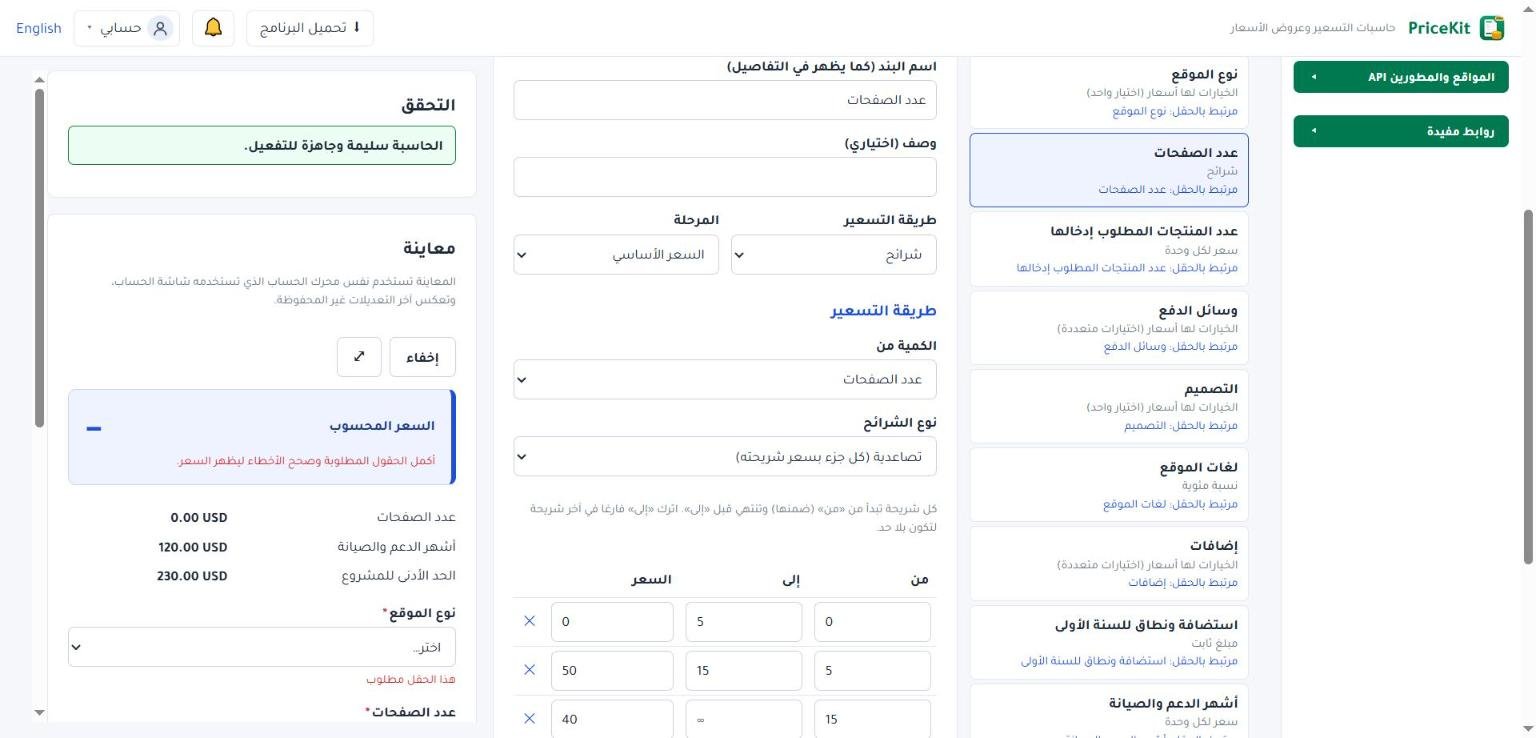
لكل بند اسم البند (كما يظهر في التفاصيل) وطريقة التسعير والمرحلة.
الطرق
مبلغ ثابت
يضيف المبلغ نفسه دائمًا ما دام البند مفعلًا. مثال: رسوم إعداد $25.
سعر لكل وحدة
اختر الكمية من (حقل رقم أو مبلغ، أو قيمة محسوبة) واكتب السعر لكل وحدة. مثال: 8 منشورات × $15 = $120.
سعر لكل عدد من الوحدات (مثل 200 لكل 60 ثانية)
اكتب السعر لكل وحدة ولكل (عدد الوحدات). مثال: فيديو إعلاني $200 لكل 60 ثانية؛ فيديو 90 ثانية = 90 ÷ 60 × $200 = $300.
الخيارات لها أسعار (اختيار واحد) والخيارات لها أسعار (اختيارات متعددة)
اختر حقل الاختيار واكتب في جدول سعر كل خيار سعر كل خيار. في الاختيارات المتعددة تُجمع أسعار الخيارات المختارة، ويظهر كل خيار في سطر. مثال: إنستغرام $10، تيك توك $15، لينكدإن $10؛ اختيار إنستغرام وتيك توك = $25.
مبلغ يدخل يدويا أثناء الحساب
اختر حقل المبلغ اليدوي، وهو حقل من نوع مبلغ مالي. يُضاف المبلغ المكتوب كما هو، مثل تكلفة طباعة قدرها $85 تختلف من طلب لآخر.
نسبة مئوية
زيادة أو خصم بنسبة من بنود أخرى أو من مجموع، مثل رسوم استعجال 20% أو ضريبة 15%. التفاصيل في الإضافات والخصومات والضرائب.
شرائح
اختر الكمية من ونوع الشرائح، ثم املأ الجدول: من وإلى والسعر لكل شريحة بزر إضافة شريحة. «من» داخل الشريحة و«إلى» خارجها، واترك «إلى» فارغًا في آخر شريحة لتكون بلا حد.
مثال بشرائح: من 0 إلى 10 بسعر $15، من 10 إلى 30 بسعر $12، من 30 بلا حد بسعر $10، والعميل يطلب 12 منشورًا:
| نوع الشرائح | طريقة الحساب | السعر |
|---|---|---|
| شريحة واحدة على كامل الكمية | الكمية كلها بسعر الشريحة التي تقع فيها: 12 × $12 | $144 |
| تصاعدية (كل جزء بسعر شريحته) | أول 10 × $15 + المنشوران الباقيان × $12 | $174 |
| مبلغ ثابت لكل شريحة | «السعر» هنا مبلغ الشريحة كلها؛ لو كانت الأسعار $120 و$250 و$400 فإن 12 تقع في الثانية | $250 |
إذا لم تقع الكمية في أي شريحة يظهر تنبيه «الكمية لا تقع ضمن أي شريحة، فلم يحتسب لها سعر». ولترك فراغ مقصود بين الشرائح فعّل السماح بفجوات بين الشرائح.
الحد الأدنى للطلب
يضمن ألا يقل السعر عن مبلغ تحدده. اقرأ الحد الأدنى للطلب.
الظهور
- مفعل تلقائيا (بدون قاعدة): ألغِه لبند تريد تفعيله بقاعدة فقط، مثل رسوم الاستعجال. انظر القواعد.
- يظهر للعميل في تفاصيل السعر: ألغِه لبند داخلي لا تريد أن يراه العميل سطرًا مستقلًا.
يُقرَّب مبلغ كل بند إلى عدد الخانات العشرية للحاسبة، والأرقام في المنتصف تُقرَّب للأعلى (10.125 تصبح 10.13).
Every pricing method on the Pricing tab with examples: fixed amount, per unit, option prices, manual amount, percentages and tiers.
Each item on the Pricing tab turns part of the customer’s answers into an amount, and its Pricing method decides how. The price is the sum of the active items.
Where items come from
- Turning on Used in pricing for a field adds an item linked to it (marked “Linked to field: …”).
- Or click Add price item for a general item that is not tied to a field; it starts as a Fixed amount.
Every item has an Item name (as shown in the breakdown), a Pricing method and a Stage.
The methods
Fixed amount
Always adds the same Amount while the item is active. Example: a $25 setup fee.
Price per unit
Pick Quantity from (a number or money field, or a calculated value) and enter the Price per unit. Example: 8 posts × $15 = $120.
Price per N units (e.g. 200 per 60 seconds)
Enter the Price per unit and Per (number of units). Example: an ad video at $200 per 60 seconds; a 90-second video = 90 ÷ 60 × $200 = $300.
Options have prices (single choice) and Options have prices (multiple choice)
Pick the Choice field and fill in the Price of each option table. With multiple choice, the prices of the chosen options are added up and each option gets its own line. Example: Instagram $10, TikTok $15, LinkedIn $10; choosing Instagram and TikTok = $25.
Amount entered during calculation
Pick the Manual amount field, a field of type Money amount. Whatever amount is typed is added as it is, such as an $85 printing cost that changes from job to job.
Percentage
A surcharge or discount as a percentage of other items or of a subtotal, such as a 20% rush fee or 15% tax. Details in Surcharges, discounts and taxes.
Tiered pricing
Pick Quantity from and a Tier type, then fill the table with From, To and Price for each tier using Add tier. “From” is inside the tier and “To” is not; leave “To” empty in the last tier for no limit.
Example tiers: 0 to 10 at $15, 10 to 30 at $12, 30 and up at $10, and the customer orders 12 posts:
| Tier type | How it works | Price |
|---|---|---|
| Volume (one rate for the whole quantity) | The whole quantity at the rate of the tier it falls in: 12 × $12 | $144 |
| Progressive (each part at its tier rate) | First 10 × $15 + the other 2 × $12 | $174 |
| Fixed amount per range | “Price” is the amount for the whole range; with $120, $250 and $400, 12 falls in the second range | $250 |
If the quantity falls in no tier, you see the warning “The quantity matches no tier, so no price was added”. To leave an intended gap between tiers, turn on Allow gaps between tiers.
Minimum order
Makes sure the price never falls below an amount you choose. See Minimum order.
Visibility
- Active by default (without a rule): untick it for an item that only a rule should switch on, such as a rush fee. See Rules.
- Shown to the customer in the price breakdown: untick it for an internal item you do not want listed as its own line.
Each item’s amount is rounded to the calculator’s decimal places, and midpoint values round away from zero (10.125 becomes 10.13).
لم تجد جوابك؟Didn’t find your answer?
اطّلع على الأسئلة الشائعة، أو جرّب قالباً جاهزاً، أو راسلنا وسنرد عليك في أقرب وقت.See the FAQ, try a ready template, or write to us and we will answer as soon as we can.
الأسئلة الشائعةFAQ مكتبة القوالبTemplate library تواصل معناContact us