
تعرّف على الشريط العلوي والقائمة الجانبية والتبويبات والإشعارات وتبديل اللغة في تطبيق الويب.
هذه جولة سريعة في تطبيق الويب حتى تعرف أين تجد كل شيء: الشريط العلوي، والقائمة الجانبية، والتبويبات، والإشعارات، واللغة.
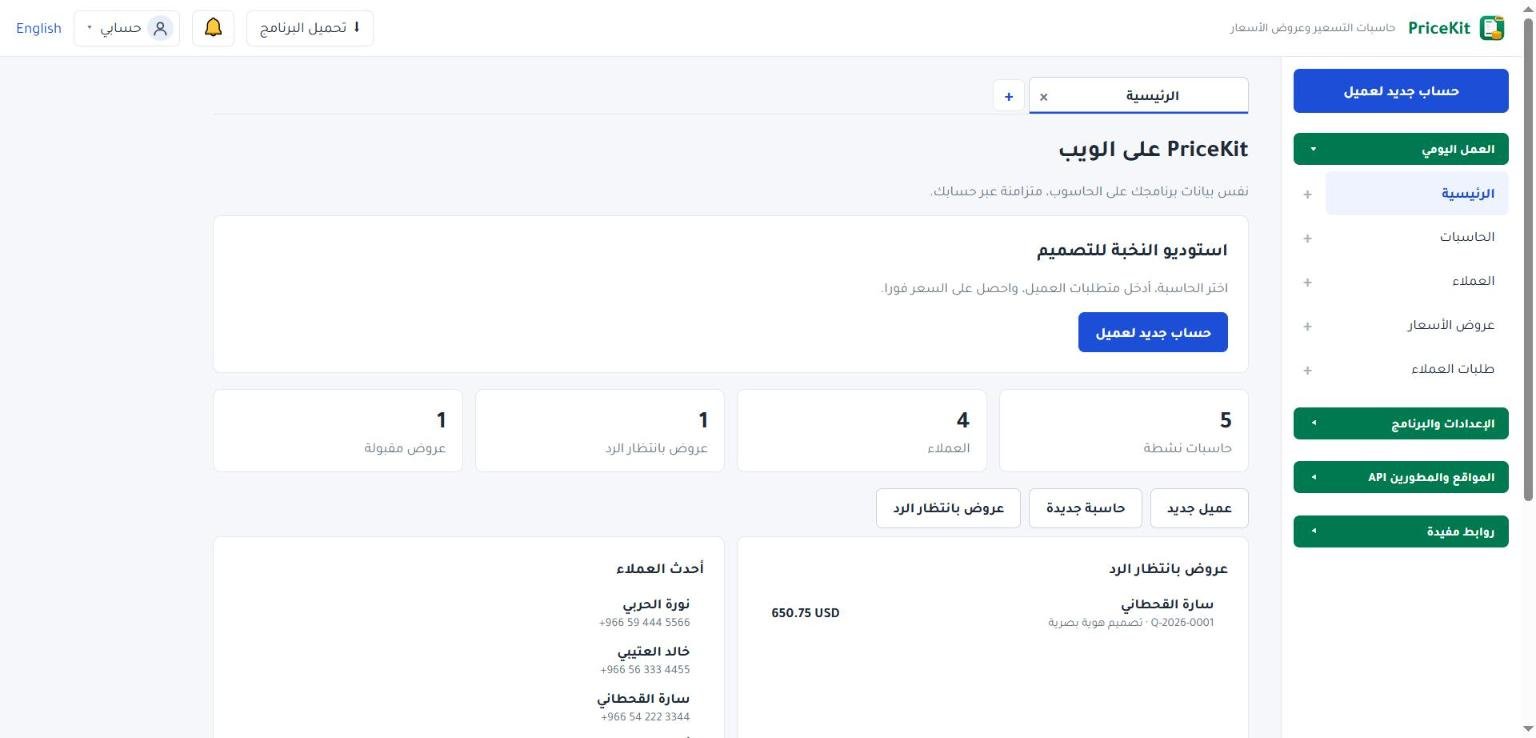
الشريط العلوي
- تحميل البرنامج: لتحميل برنامج ويندوز (للمشتركين).
- الجرس 🔔 الإشعارات: طلبات العملاء الجديدة وأخبار PriceKit. يظهر عليه عدد ما لم تقرأه.
- حسابي: يعرض بريدك، وفيه حسابي لفتح صفحة إدارة الحساب، وتسجيل الخروج.
- رابط اللغة: يظهر عليه اسم اللغة الأخرى (English أو العربية). اضغطه لتبديل لغة التطبيق.
على الهاتف تظهر القائمة الجانبية بزر ☰ القائمة.
القائمة الجانبية
في أعلاها زر كبير حساب جديد لعميل لحساب سعر جديد مباشرة. تحته أربع مجموعات، تفتح كل واحدة أو تغلقها بالضغط على عنوانها:
| المجموعة | ما فيها |
|---|---|
| العمل اليومي | الرئيسية، الحاسبات، العملاء، عروض الأسعار، طلبات العملاء (مع عدد الطلبات الجديدة) |
| الإعدادات والبرنامج | الإعدادات، حول البرنامج |
| المواقع والمطورين | موقعك والـ API، المفاتيح وإضافة ووردبريس، Webhooks، دليل المطورين |
| روابط مفيدة | مساعدة، مكتبة القوالب، الأسئلة الشائعة، سياسة الخصوصية، شروط الاستخدام |
عند فتح التطبيق تكون مجموعة العمل اليومي وحدها مفتوحة. يمكنك تغيير ذلك من الإعدادات في قسم القائمة الجانبية. راجع الإعدادات.
التبويبات
يعمل التطبيق بتبويبات مثل المتصفح، فتفتح أكثر من صفحة معًا وتتنقل بينها دون أن تفقد عملك.
- زر + بجانب أي عنصر في القائمة يفتحه في تبويب جديد.
- زر + في شريط التبويبات يفتح تبويبًا جديدًا للصفحة الرئيسية، واختصاره Alt+T. ويغلق Alt+W التبويب الحالي.
- النقطة ● على تبويب تعني تعديلات غير محفوظة. عند إغلاقه يسألك: حفظ ثم إغلاق أو إغلاق بدون حفظ.
- إذا أعدت تحميل الصفحة تعود تبويباتك كما كانت.
الصفحة الرئيسية
تعرض اسم نشاطك وزر حساب جديد لعميل، ثم أرقامًا سريعة: حاسبات نشطة والعملاء وعروض بانتظار الرد وعروض مقبولة. تحتها أحدث العملاء وأحدث عروض الأسعار.
الإشعارات
اضغط الجرس لترى آخر الطلبات الجديدة والأخبار. اضغط ✓ بجانب عنصر لـ تمييز كمقروء، أو تمييز الكل كمقروء. زر كل طلبات العملاء يفتح صفحة الطلبات. إذا وصل طلب وأنت تعمل، تظهر رسالة صغيرة فيها زر عرض الطلبات. وتصلك أيضًا رسالة على بريدك عند كل طلب جديد.
إذا ظهر شريط ملوّن أعلى الصفحة فهو يخص حالة اشتراكك، مثل موعد انتهاء التجربة. راجع التجربة والاشتراك.
برنامج ويندوز فيه الأقسام نفسها تقريبًا، واختصارا التبويبات فيه Ctrl+T وCtrl+W.
Get to know the top bar, side menu, tabs, notifications and language switch of the Web App.
A quick tour of the Web App so you know where everything is: the top bar, the side menu, tabs, notifications and language.
The top bar
- Download the program: downloads the Windows program (for subscribers).
- The bell 🔔 Notifications: new customer requests and PriceKit news, with a count of unread items.
- My account: shows your e-mail, with My account to manage the account and Sign out.
- The language link shows the other language’s name (العربية or English). Click it to switch the app’s language.
On a phone, the side menu opens with the ☰ Menu button.
The side menu
At the top is the big New Customer Calculation button for pricing a new job right away. Below it are four groups; click a group’s title to open or close it:
| Group | What it holds |
|---|---|
| Daily work | Home, Calculators, Customers, Quotes, Customer requests (with the number of new requests) |
| Settings and program | Settings, About |
| Websites & developers | Website & API, Keys and WordPress plugin, Webhooks, Developer guide |
| Useful links | Help, Template library, FAQ, Privacy policy, Terms of use |
When the app opens, only Daily work is open. You can change that under Side menu in Settings. See Settings.
Tabs
The app works with tabs, like a browser, so you can keep several pages open and switch between them without losing your work.
- The + next to any menu item opens it in a new tab.
- The + in the tab strip opens a new Home tab (shortcut Alt+T). Alt+W closes the current tab.
- A dot ● on a tab means Unsaved changes. When you close it, you are asked to Save and close or Close without saving.
- If you reload the page, your tabs come back as they were.
The Home page
It shows your business name and the New Customer Calculation button, then quick numbers: Active calculators, Customers, Pending quotes and Accepted quotes. Below are Recent customers and Recent quotes.
Notifications
Click the bell to see the latest new requests and news. Click ✓ next to an item to Mark as read, or use Mark all as read. All customer requests opens the requests page. If a request arrives while you are working, a small notice appears with a View requests button. You also get an e-mail for every new request.
A coloured strip at the top of the page is about your subscription, for example when your trial ends. See Trial and subscription.
The Windows program has nearly the same sections; its tab shortcuts are Ctrl+T and Ctrl+W.
لم تجد جوابك؟Didn’t find your answer?
اطّلع على الأسئلة الشائعة، أو جرّب قالباً جاهزاً، أو راسلنا وسنرد عليك في أقرب وقت.See the FAQ, try a ready template, or write to us and we will answer as soon as we can.
الأسئلة الشائعةFAQ مكتبة القوالبTemplate library تواصل معناContact us